 By Saurav
 You can transfer cryptocurrency from one wallet to another by copying the receiving wallet’s address, choosing the same blockchain network on both sides, entering the amount, paying the network fee, and confirming the transaction, and then waiting for the network to confirm it. The steps are simple, but the stakes are higher than with a bank transfer, because blockchain transactions can’t be reversed: a wrong address or the wrong network can mean permanent loss. A careful routine, built around a small test transfer and a few checks, removes almost all of the risk. This is general information, not investment advice.
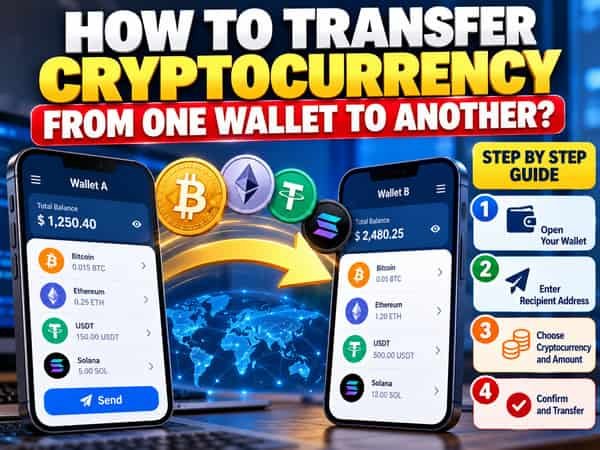
Before You Start: Three Things to Understand
- A transfer moves the right to spend coins, not the coins themselves, which stay on the blockchain. Your wallet signs a transaction that reassigns them to another address.
- The network matters as much as the address. The same coin can exist on several networks, and an address that looks valid on one can be unreachable on another.
- Transactions are final. Once confirmed, nobody can cancel or refund a transfer, unless the recipient chooses to send it back.
Step-by-Step Instructions
Step 1: Decide the coin and the network. Check what coin you’re sending and which blockchain it’s on. For example, a dollar stablecoin might be available on Ethereum, Solana, TRON, and others, and fees and speed differ widely.
Step 2: Open the receiving wallet and get the address. Select the same coin and network, then tap “Receive.” The wallet shows an address and usually a QR code. Make sure the label shows the network you plan to use.
Step 3: Copy the address carefully. Use the copy button or scan the QR code instead of typing it by hand. After pasting, compare the beginning and end of the address, ideally the whole thing, with the original.
Step 4: Open the sending wallet and choose “Send.” Select the coin, paste the address, and pick the network.
Step 5: Enter the amount. Check whether you’re entering the amount in coins or in rupees or dollars.
Step 6: Review the fee. Most wallets suggest a fee based on current network conditions. Higher fees confirm faster, while lower ones may wait.
Step 7: Send a small test transaction first. For anything meaningful, send a small amount, confirm that it arrives, and then send the remainder. The extra fee is cheap insurance.
Step 8: Confirm and sign. Approve the transaction with your PIN, biometrics, or, on a hardware wallet, by pressing the buttons on the device after checking the address on its screen.
Step 9: Track it. Copy the transaction ID (hash) and paste it into a block explorer for that network to see its status and confirmations.
Step 10: Verify the arrival. Once confirmed, check the balance in the receiving wallet. Then send the rest if you used a test amount.
Special Case: Moving From an Exchange to a Wallet
- Add the wallet address to the exchange’s withdrawal screen, often called the whitelist, and choose the network.
- Check the exchange’s minimum withdrawal amount and fee, since a flat withdrawal fee can be significant for small amounts.
- Expect security checks: two-factor authentication, email confirmation, and sometimes a waiting period for new addresses.
- Allow for the exchange’s processing time before the blockchain transaction even starts.
Special Case: Moving From a Wallet to an Exchange
- Get the exchange’s deposit address for the exact coin and network.
- Check whether a memo or tag is required. Some coins, such as XRP and Stellar’s XLM, need an extra memo or destination tag so the exchange can credit your account. Leaving it out can delay or lose the deposit.
- Wait for the required confirmations, since exchanges credit deposits only after a set number.
Special Case: Moving Between Wallets You Own
- Sending to yourself works the same way as sending to anyone else, but double-check that both wallets support the coin and network.
- If you’re moving everything to a new hardware wallet, set up the new wallet, back up its recovery phrase, and test with a small amount before moving the rest.
- Keep records of transfers between your own wallets, since they help demonstrate cost basis later.
Paying the Right Fee
- Network fees go to miners or validators, not to your wallet provider.
- Native coin for gas: on many networks, tokens need a small balance of the network’s native coin to pay fees. For example, sending an Ethereum-based token requires some ETH, and sending a token on Solana requires a little SOL. If your wallet has none, the transfer won’t go through.
- Fees vary with demand. Busy periods cost more, and quiet periods cost less, so non-urgent transfers can wait.
- Choose a network with low fees when you have a choice, but make sure the receiving side supports it.
When the Coin Needs to Change Networks
Sometimes you hold a coin on one blockchain but need it on another.
- Bridges move assets between networks by locking them on one side and issuing a representation on the other. They can be convenient but add smart contract risk and can be targeted by attacks, so use well-established services and start with small amounts.
- Exchanges can handle the conversion for you: deposit on one network and withdraw on another, which is often simpler for beginners.
- Swaps within a wallet can convert between assets, sometimes across networks, with fees and price impact.
Always confirm that the destination wallet supports the new network before starting.
Common Mistakes and How to Avoid Them
- Wrong network: sending an asset on a network the receiving address doesn’t support. Always match both sides.
- Mistyped or swapped address: use copy and paste, and check the full address. Beware of clipboard malware that replaces addresses, and of lookalike addresses in your history (address poisoning).
- Missing memo or tag: check whether the receiving platform requires one.
- No gas: having tokens but no native coin to pay the fee.
- Sending below a minimum: some platforms ignore deposits below a threshold.
- Using a low fee in a rush: the transaction may sit unconfirmed for hours.
- Sending to a smart contract or wrong wallet type that can’t accept the asset.
- Falling for scams: unsolicited “support” asking you to move funds to a “safe wallet” is a classic fraud.
- Skipping the test transaction.
What If Something Goes Wrong
- If the transaction is pending, check the fee and the explorer. Some wallets let you speed it up or replace it with a higher fee. Otherwise it may drop out and return funds after a while.
- If you sent to a wrong address you don’t control, the funds are generally unrecoverable.
- If you sent to an exchange without a required tag or on a slightly wrong network, contact the exchange’s support with your transaction ID, since some can help, though there’s no guarantee and fees may apply.
- Never pay anyone who offers to “recover” lost crypto for a fee, since many are scams.
Security Habits for Every Transfer
- Verify the address on a trusted screen, especially with a hardware wallet.
- Use official apps and websites, and don’t click links in unsolicited messages.
- Never share your recovery phrase, and never enter it to “validate” a transfer.
- Take your time. Rushing is how mistakes happen.
- Keep devices updated and free of suspicious software.
Record-Keeping and Tax in India
- Save the transaction ID, date, amount, addresses, and fee for every transfer.
- Moving crypto between your own wallets is generally not the same as selling, but the rules can be nuanced, so check the current provisions.
- Selling or swapping crypto is taxed at a flat rate on gains, with a 1% TDS on eligible transactions, and losses can’t be offset against other income.
- Use registered platforms and keep clear statements.
Frequently Asked Questions
Q1. How long does a crypto transfer take?
A. It depends on the blockchain network. Transfers can take just a few seconds on faster networks, while Bitcoin may take around an hour for multiple confirmations. Crypto exchanges may also add their own processing time.
Q2. Can I cancel a crypto transfer?
A. Generally, a crypto transfer cannot be cancelled once it has been confirmed on the blockchain. Some wallets and networks may allow a pending transaction to be replaced with one carrying a higher fee before confirmation.
Q3. Why do I need to choose a network when sending crypto?
A. The same cryptocurrency or token can be available on multiple blockchain networks. The sending and receiving platforms must support the same network; otherwise, the funds may not arrive correctly and could be difficult or impossible to recover.
Q4. Do I always pay a fee to transfer crypto?
A. Usually, yes. Most public blockchains charge a network fee that helps compensate those who process or validate transactions. However, some networks are designed to offer feeless transactions.
Q5. Is it safe to send a small test transaction first?
A. Yes. Sending a small test transaction first is a useful precaution because it helps confirm that the wallet address and selected network are correct before transferring a larger amount.